





Every time your log volume grows, your ability to search it effectively is under pressure. Slower queries, shorter retention windows, and incomplete incident histories are not Elasticsearch problems — they are symptoms of storing log data the wrong way. LogsDB is Elasticsearch’s native answer: a purpose-built index mode that stores logs the way logs should be stored, so you can search more of them, further back in time, and faster.

When log volumes grow, the first casualty is not disk space — it’s search depth. Teams start shortening retention windows to keep clusters manageable. What was 90 days became 60, then 30. At the point an incident needs investigation, the logs that would answer the question are already gone.
The underlying cause is structural. Elasticsearch’s default indexing model stores every document as a full raw _source JSON blob on disk, on top of an inverted index for search and doc values for sorting and aggregations. For log data — which is append-only, time-series, and queried against a small subset of fields — the _source blob is the problem. It is a verbatim copy of every document, stored at full size, for every log line ever written. At scale, it consumes the majority of your index storage.
The clusters we work with regularly show _source storage as the single largest contributor to log index size — not the inverted index, not doc values. This is the inefficiency that drives the retention trade-off, and it is entirely addressable.
LogsDB is a native index mode in Elasticsearch, designed specifically for log workloads. It is not a plugin, a third-party tool, or a workaround — it is how Elastic intends logs to be stored when storage efficiency and search performance matter. Activating it takes one line of configuration.
The mechanism is precise. LogsDB drops the raw _source blob entirely and replaces it with a synthetic source. When a document’s source is requested, Elasticsearch reconstructs it on-the-fly from doc values, which are stored in a columnar format. Columnar storage groups the same field together across all documents.
For log data, where fields like hostnames, log levels, service names, and status codes repeat across millions of documents, the compression ratios are dramatically better than storing individual JSON blobs per document.
On top of this, LogsDB automatically sorts log events by timestamp and host at write time. This further tightens compression and accelerates the time-range queries that dominate log search — the exact queries your team runs when something breaks.
Search behaviour is completely unchanged. The inverted index that powers full-text search remains intact. Queries run identically. What changes is how much log data fits in your cluster, and therefore how far back those queries can reach.
In standard index mode, Elasticsearch stores and respects whatever _id value your ingestion pipeline assigns to each document. This is commonly used for deduplication (re-indexing the same document with the same _id is idempotent) and for upsert workflows where a known _id is required to update an existing document.
LogsDB does not support custom _id values by default. Because _id is not stored in doc values, it cannot be reconstructed via synthetic source — so LogsDB disables user-provided _ids and generates a synthetic identifier internally instead. Attempts to index a document with an explicit _id into a LogsDB index will either be silently overridden or rejected, depending on configuration.
For most log infrastructure, this is a non-issue. Logs are append-only by nature, and synthetic _id generation has no observable impact on search, aggregation, or source retrieval. But if your pipeline was built with _id-based deduplication as a reliability mechanism — a common pattern when dealing with at-least-once delivery guarantees from Kafka or similar systems — audit that logic before enabling LogsDB. Move the deduplication gate to your ingestion layer, and LogsDB will behave exactly as expected downstream.
One setting in your index template. No pipeline changes, no schema migration, no reingestion of existing data.
This applies only to new indices matching the pattern. Existing indices are unaffected. You can roll it out on new data streams immediately while historical data stays on standard mode — no disruption, no downtime.
// PUT _index_template/logsdb-template

{

  "index_patterns": ["logs-*"],

  "data_stream": {},

  "template": {

    "settings": {

      "index.mode": "logsdb"    // This is all it takes

    }

  }

}
To put a precise figure on the storage impact, we ingested the same log dataset into two indices on the same cluster — identical shard count (1), identical replica configuration (0 replicas), identical documents. The only variable: the index mode.
Both indices were queried with GET _cat/indices/test*?v&s=store.size after ingestion:


807.7 MB on a standard index. 355.4 MB on LogsDB. The same 1,453,992 documents, verified with _count on both indices. All shards healthy (total: 1, successful: 1, skipped: 0, failed: 0):
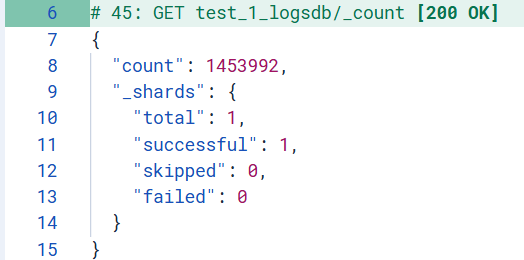
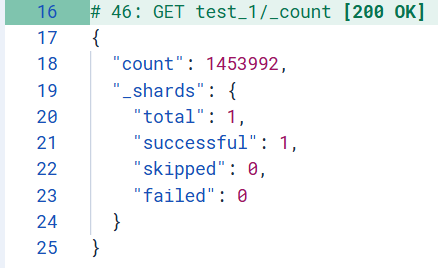
Not a single document dropped. Not a single shard failed. The 56% storage reduction comes entirely from eliminating the raw _source blob — with zero impact on document count, zero impact on shard health, zero impact on search.
56% less storage is not a cost line item — it is search coverage. Here is what it means in practice:
At 10 TB of log data, LogsDB brings that to approximately 4.4 TB on the same hardware. That is 5.6 TB of reclaimed capacity — which translates directly into extended retention. A team running 30-day retention today could move to 60+ days on the same cluster, with the same infrastructure spend. A team already at 90 days could double their history without adding a single node.
For incident investigation, this matters enormously. The difference between 30-day and 60-day retention is often the difference between finding the root cause and not. Log data that was being deleted to manage disk costs becomes searchable history.
For teams on managed Elasticsearch services where storage is billed per GB, the cost reduction is immediate and measurable. But the more important outcome is what you keep: more logs in the cluster means more to search.
Rollout risk is low. The change is scoped to new indices, requires no downtime, and leaves existing data untouched. You can adopt it on a single data stream today and measure the impact before rolling it further.
| WORKLOAD | LOGSDB? | WHY |
|---|---|---|
| Application logs | YES | Append-only, time-series — ideal fit for LogsDB’s architecture |
| Infrastructure & server logs | YES | High ingest volume amplifies the storage savings |
| Container & Kubernetes logs | YES | Structured, repetitive fields compress well under columnar storage |
| Security / SIEM logs | YES | Long retention requirements make the storage reduction compound over time |
| Metrics & time-series | NO | Use Elasticsearch’s dedicated metrics index mode instead |
| Heavy aggregation workloads | NO | Synthetic source reconstruction adds overhead when aggregations dominate |
| Pipelines with unmapped dynamic fields | NO | Unmapped fields cannot be reconstructed via synthetic source — data loss risk |
| Distributed traces | NO | Trace access patterns differ fundamentally from log workloads |
LogsDB solves the right problem. The _source blob is the largest single contributor to log index size, and also the structure least likely to be needed at query time for typical log workloads. Replacing it with columnar reconstruction via synthetic source is architecturally sound — the compression gains are real, the search behaviour is unchanged, and the deployment path is minimal.
The 56% reduction we observed on 1,453,992 documents — 807.7 MB down to 355.4 MB, confirmed with identical _count responses on both indices and clean shard health across both — is consistent with Elastic’s documented range of 60–65%. Variance is driven by field cardinality and repetition patterns in your specific log schema. High-cardinality dynamic fields will see less benefit and carry risk around unmapped field reconstruction; well-structured pipelines with explicit schema mapping will see results at or above what we observed.
For any team managing Elasticsearch log infrastructure on 8.17+, the calculus is straightforward: audit your schema, map your fields explicitly, and enable LogsDB on new data streams. The storage you save is not an end in itself — it is the means to keep more logs, search deeper into your history, and get better answers when they matter most.