


The alert did not say the system is down. It never does.
It said users were intermittently unable to connect. This is the most dangerous kind of failure: silent, inconsistent, and already impacting traders, operations teams, and compliance workflows.
At the center of it was a familiar suspect in large enterprise environments: the remote access gateway. In this case, VMware Horizon Unified Access Gateway was doing exactly what it was configured to do, but not what the business expected during failure.
That moment forced a hard architectural question. Is our access layer truly highly available, or just redundant on paper?
Recently, I was involved in a project for a large capital market organization in India where VMware Horizon played a critical role in enabling secure remote access. The objective was to strengthen the availability and resilience of the VMware Horizon Unified Access Gateway (UAG) layer, while keeping security and operational simplicity front and center. The organization wanted to leverage NGINX Plus to intelligently manage workload distribution across multiple UAG instances and ensure a consistent user experience, even during failures.
In this environment, VMware Horizon was used to provide remote access to internal applications and virtual desktops. Unified Access Gateway acted as the external entry point for all users. Given the scale and sensitivity of large operations, it was clear early on that the access architecture needed to meet a few non-negotiable requirements:
The existing setup did not fully meet these expectations, particularly when it came to predictable failover behavior during gateway outages.
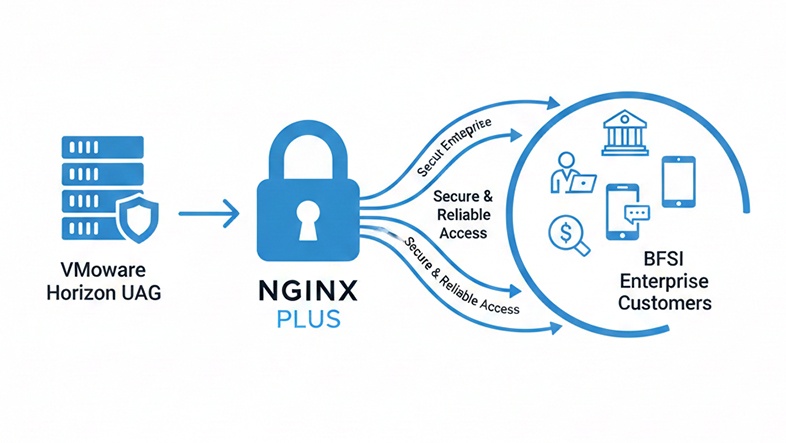
To address these gaps, we introduced NGINX Plus as a dedicated load balancer in front of multiple VMware Horizon UAG instances. All inbound user traffic terminated at NGINX Plus, which allowed us to control how traffic was distributed and ensure that only healthy gateways were serving users.
Multiple NGINX Plus instances were deployed to avoid introducing any new single points of failure. To manage them consistently, NGINX Instance Manager was implemented centrally, giving us a single place to manage configuration, visibility and lifecycle operations across all load balancers.
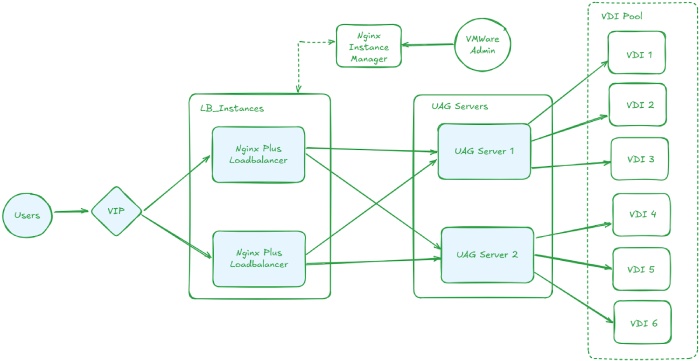
NGINX Plus enabled intelligent traffic distribution across UAG instances. This ensured that traffic was always routed to healthy gateways and removed reliance on any single UAG node.
One of the key considerations was support for multiple VMware Horizon protocols. The setup handled:
NGINX Plus handled these protocols reliably, even during peak usage periods.
Session stickiness was configured so that users remained connected to the same UAG instance throughout authentication and active desktop sessions. This was essential to avoid session drops and maintain a consistent user experience.
Health checks were aligned with actual UAG service behavior rather than simple port checks. When a gateway became unhealthy, it was automatically removed from traffic rotation and added back only after services fully recovered.
TLS termination and traffic handling were centralized at NGINX Plus. Only the required ports were exposed externally, while backend communication with UAG instances was restricted to private networks, aligning well with BFSI security expectations.
As the number of NGINX Plus instances grew, centralized management became increasingly important. NGINX Instance Manager provided a single control plane that enabled:
This approach reduced manual effort and helped prevent configuration drift across the environment.
From a user perspective, access remained simple. Users connected through a single public URL exposed via NGINX Plus. Requests were evaluated and routed to a healthy UAG instance based on defined policies. If a UAG instance became unavailable, NGINX Plus automatically redirected traffic to another gateway without user disruption.
The solution delivered tangible improvements:
The access platform is now resilient, scalable and significantly easier to operate.
By using NGINX Plus as the load-balancing layer and NGINX Instance Manager for centralized control, I was able to deliver the availability, security, and operational consistency expected in BFSI environments.
This experience reinforced the importance of designing remote access platforms with resilience and operations in mind and showed how the right application delivery platform can make a meaningful difference in mission-critical enterprise environments.