


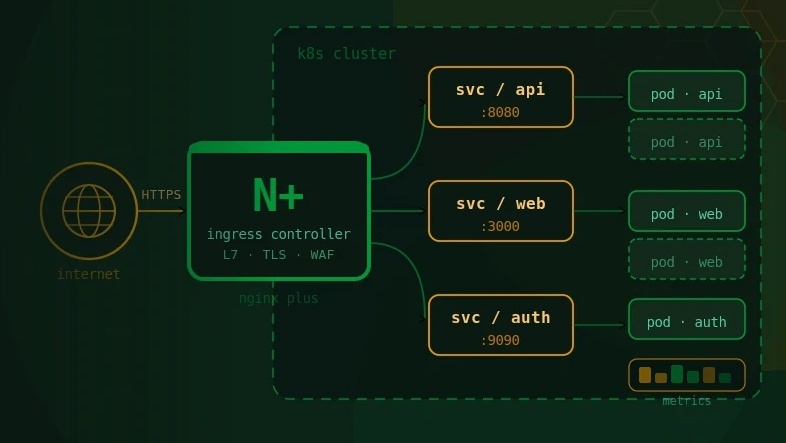

For years, the Kubernetes community-maintained ingress-nginx controller served as the default entry point for HTTP traffic into Kubernetes clusters. At its peak, it was estimated to be deployed in more than 40% of Kubernetes clusters, accumulating over 10 million Docker Hub downloads. However, on March 24, 2026, the project was officially archived. Version 1.15.1 was its final release. No further security patches, bug fixes, or feature development will follow.
This was not an overnight decision. For years the project operated on thin maintenance — largely sustained by one or two engineers working outside business hours. The situation became critical in early 2025 when CVE-2025-1974, commonly known as IngressNightmare, was disclosed with a CVSS score of 9.8. This critical remote code execution vulnerability, capable of enabling full cluster takeover, underscored just how high the stakes are for unmaintained ingress infrastructure.
The practical consequence is clear: clusters still running ingress-nginx are now accumulating unpatched CVEs with no remediation path. For organizations in regulated sectors — financial services, insurance, or telecommunications — operating with end-of-life infrastructure is not merely a technical concern but a compliance and governance risk.
The F5 NGINX Ingress Controller (nginx/kubernetes-ingress) is a Kubernetes-native Ingress implementation built and maintained directly by the NGINX engineering team at F5. It supports both NGINX Open Source and NGINX Plus as its data plane and is available in two tiers:
A key differentiator from the community controller is that F5 develops and maintains both the load balancer engine (NGINX/NGINX Plus) and the controller application itself. This unified ownership model means that the ingress layer benefits from native NGINX capabilities — with significantly less dependency on Lua-driven extension behavior compared with the community ingress-nginx controller, reducing the associated memory leak and OOM crash risks.
The Open Source tier of NGINX Ingress Controller is production-capable for many use cases. However, in enterprise environments — particularly those governed by SLAs, zero-downtime mandates, or security compliance frameworks — NGINX Plus unlocks a qualitatively different operational posture:
The most significant conceptual change when moving to the F5 NGINX Ingress Controller is the configuration philosophy. The community ingress-nginx controller was annotation-driven. Complex behaviors — rewrite rules, canary weights, rate limits, authentication — were expressed as opaque key-value string annotations on standard Kubernetes Ingress resources. This approach, while flexible, had serious drawbacks: no schema validation, no IDE autocompletion, and brittle Lua-based extensions that could introduce memory leaks and out-of-memory crashes.
The F5 NGINX Ingress Controller is CRD-native. Its primary configuration model uses Custom Resource Definitions that are schema-validated by the Kubernetes API server at apply time — misconfigured resources are rejected before they ever reach NGINX. The five core CRDs are:
For teams that need a phased migration approach, the F5 controller also supports standard Kubernetes Ingress resources with its own annotation syntax (nginx.org/* prefix, distinct from ingress-nginx’s nginx.ingress.kubernetes.io/* prefix). This means you can initially migrate the controller without rewriting every Ingress manifest, then progressively adopt CRDs where advanced behavior is needed.
A successful migration begins with a thorough audit of the current state. Ingress migrations that fail typically do so because teams discover undocumented annotation usage mid-migration. The inventory phase is non-negotiable.
First, confirm you are running the community ingress-nginx controller:
kubectl get pods --all-namespaces --selector app.kubernetes.io/name=ingress-nginxThen enumerate all Ingress resources cluster-wide:
kubectl get ingress --all-namespaces -o yaml > ingress-inventory.yamlExtract all unique annotations in use across your Ingress resources:
kubectl get ingress --all-namespaces -o json | \

jq -r '.items[].metadata.annotations | keys[]' | sort -uOnce you have the full annotation inventory, classify each annotation into one of three migration categories:
The community controller uses a ConfigMap for global NGINX settings. Document all keys in use and map them to their NGINX Ingress Controller ConfigMap equivalents — the key names often differ. The official migration guide at docs.nginx.com provides a complete ConfigMap key translation table.
Before executing the migration, define measurable success criteria:
Attempting a big-bang migration of a production Ingress controller is high-risk and unnecessary. Both controllers can run concurrently in the same cluster using separate IngressClass resources, enabling a controlled, service-by-service migration with real-time validation at each step.
The following are the most commonly encountered annotation translations. The complete 130+ annotation mapping reference is available at kubernetes.nginx.org/ingress-nginx-migration.html.
Before (ingress-nginx):
annotations:

  nginx.ingress.kubernetes.io/rewrite-target: /$2

  nginx.ingress.kubernetes.io/use-regex: "true"

...

path: /api(/|$)(.*)
After (VirtualServer):
routes:

  - path: ~/api(/|$)(.*)

    action:

      proxy:

        upstream: api-svc

        rewritePath: /$2
Before (ingress-nginx):
annotations:

  nginx.ingress.kubernetes.io/canary: "true"

  nginx.ingress.kubernetes.io/canary-weight: "20"
After (VirtualServer with traffic splitting):
routes:

  - path: /

    splits:

      - weight: 80

        action:

          pass: app-stable

      - weight: 20

        action:

          pass: app-canary
Before (ingress-nginx):
annotations:

  nginx.ingress.kubernetes.io/limit-rps: "10"

  nginx.ingress.kubernetes.io/limit-connections: "5"
After (Policy CRD + VirtualServer or Ingress reference):
# Policy resource

apiVersion: k8s.nginx.org/v1

kind: Policy

metadata:

  name: rate-limit-policy

spec:

  rateLimit:

    rate: 10r/s

    burst: 20

    zoneSize: 10m

    key: ${binary_remote_addr}
# Attach to Ingress (v5.4.0+)

annotations:

  nginx.org/policies: rate-limit-policy
Before (ingress-nginx):
annotations:

  nginx.ingress.kubernetes.io/auth-tls-secret: default/ca-secret

  nginx.ingress.kubernetes.io/auth-tls-verify-client: "on"
After (Policy CRD):
apiVersion: k8s.nginx.org/v1

kind: Policy

metadata:

  name: mtls-policy

spec:

  ingressMTLS:

    clientCertSecret: ca-secret

    verifyClient: "on"

    verifyDepth: 2
cert-manager’s HTTP-01 ACME solver requires a standard Kubernetes Ingress resource to serve the challenge token. When migrating to VirtualServer CRDs, a common and well-proven pattern is retaining a minimal ‘shim’ Ingress resource with cert-manager annotations solely for certificate issuance, while all routing configuration moves to VirtualServer. Alternatively, DNS-01 challenge validation can be used to eliminate this dependency entirely.
WebSocket and gRPC connections that are active during a controller reload or transition may be terminated. With NGINX Plus, the dynamic reconfiguration API eliminates reload events for upstream changes, significantly reducing this risk. For the OSS tier, schedule traffic cutover during low-traffic windows and use connection draining to allow in-flight requests to complete.
The community controller exposed TCP/UDP services via a dedicated ConfigMap. The F5 controller replaces this with the TransportServer CRD, which offers a structured schema, per-listener timeout configuration, health checks, and TLS Passthrough. GlobalConfiguration registers the cluster-wide TCP/UDP listeners that TransportServer resources reference.
Some advanced ingress-nginx behaviors were implemented via custom Lua extensions — particularly for complex load balancing algorithms and sticky session logic. These have no direct equivalent and must be re-implemented using NGINX Ingress Controller’s native capabilities: the Policy CRD for session persistence (sticky cookies are now available in the OSS tier as of v5.4.0), or custom NGINX configuration snippets for lower-level behaviors. It is worth noting that the removal of Lua also eliminates the associated memory leak and OOM crash risks.
Before decommissioning the old controller, validate each of the following:
The F5 NGINX Ingress Controller is the pragmatic migration target for today — it provides the lowest friction path away from ingress-nginx while delivering enterprise-grade capabilities. However, the Kubernetes ecosystem is actively evolving toward the Gateway API as the next-generation standard for traffic management.
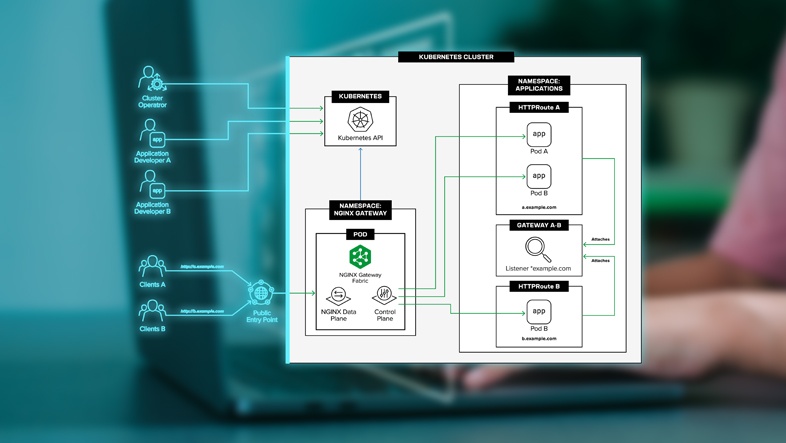
The Gateway API addresses fundamental limitations of the Ingress API: role-based access control across infrastructure owners, namespace owners, and application developers; multi-protocol support as a first-class concern; and extensibility through a well-defined object model rather than annotation proliferation.
F5 NGINX’s answer to the Gateway API is NGINX Gateway Fabric — a fully conformant implementation of the Kubernetes Gateway API with control and data plane separation, multi-cloud support, traffic splitting, and mTLS. For teams migrating today, NGINX Ingress Controller provides a stable operating foundation while Gateway Fabric matures. F5 provides the ingress2gateway CLI tool to automate conversion of Ingress resources to Gateway API HTTPRoute manifests when the time comes.
The end-of-maintenance of the community ingress-nginx controller is a forcing function, not just a lifecycle event. Organizations that act now — with a structured, phased migration plan — will not only eliminate security exposure but emerge with a more capable, maintainable, and future-proof Kubernetes networking layer.
The F5 NGINX Ingress Controller offers a genuinely low-friction migration path. Built on the same NGINX foundation, with a more structured and supportable Kubernetes control plane, a dedicated full-time engineering team, a published CVE lifecycle, structured CRD-based configuration, and a clear roadmap toward the Kubernetes Gateway API. For enterprises that need the full spectrum of capabilities — App Protect WAF, dynamic reconfiguration, active health checks, and commercial SLAs — NGINX Plus integration delivers a production-hardened ingress layer built for mission-critical workloads.
At Ashnik, as an authorized F5 NGINX partner operating across India and Southeast Asia, we have worked with organizations across the BFSI, telecom, and insurance sectors through Kubernetes infrastructure modernization initiatives. Our teams have hands-on experience designing and executing ingress migrations, including complex multi-tenant deployments, air-gapped cluster environments, and observability-integrated ingress architectures. We are well-positioned to help your organization plan and execute this migration — from initial audit through production cutover.