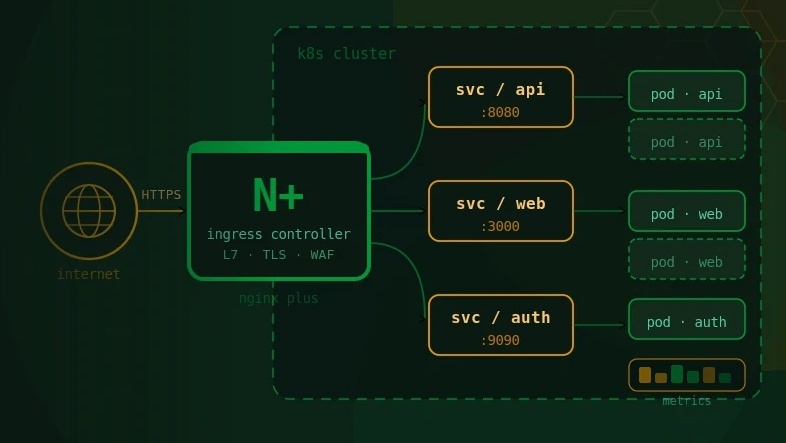


As enterprises migrate away from the deprecated community ingress-nginx controller, the ingress layer is being re-architected for the first time in years. That moment is also the right time to embed application-layer security directly into the data path. This article is a practitioner’s guide to deploying F5 WAF for NGINX (formerly NGINX App Protect WAF) on NGINX Plus and the NGINX Ingress Controller. It covers the v5 compiler-and-enforcer architecture, the declarative policy model, a phased rollout that moves from observation to enforcement without blocking legitimate traffic, worked CRD configurations, the false-positive tuning that real deployments demand, and how WAF telemetry feeds an enterprise observability stack.
For most of the last decade, enterprise security investment concentrated on the network perimeter. Firewalls, network segmentation, and IPS appliances guarded the edge while the application itself was treated as a trusted zone behind that wall. That model no longer reflects how attacks actually arrive.
The perimeter has effectively dissolved. Applications are exposed through APIs to mobile clients, partner systems, and third-party integrations. Workloads run in Kubernetes clusters that scale and reschedule continuously. Traffic that once flowed through a single hardened gateway now enters through dozens of ingress paths. The attacks have followed the traffic. Credential stuffing, API abuse, injection, and bot-driven scraping are application-layer problems, and a network firewall cannot see them because it cannot read the request.
Two developments have brought this to a head for teams running on Kubernetes.
The first is the end of the community ingress-nginx controller. The project was archived in early 2026, and a critical remote code execution vulnerability disclosed during its decline, CVE-2025-1974 (IngressNightmare, CVSS 9.8), demonstrated how exposed an unmaintained ingress layer can leave an entire cluster. Organisations migrating to the F5 NGINX Ingress Controller are rebuilding their ingress configuration anyway. That is the natural and lowest-cost moment to add a WAF in the same data path, rather than bolting one on later as a separate project.
The second is regulatory and contractual pressure, which is particularly acute for the BFSI sector across India and Southeast Asia. Frameworks such as India’s Digital Personal Data Protection Act and the RBI and IRDAI cybersecurity expectations have made application-layer protection and the safe handling of personally identifiable information a board-level concern rather than a purely technical one. A WAF that can both block malicious requests and mask sensitive data in transit is no longer a nice-to-have for a regulated workload.
The practical conclusion is straightforward. If you are modernising your Kubernetes ingress, the WAF decision belongs in the same design conversation, not in a backlog for next year.
F5 has consolidated its NGINX security products under a clearer name. What was documented for years as NGINX App Protect WAF is now F5 WAF for NGINX, with F5 DoS for NGINX as the companion Layer 7 denial-of-service module. The underlying technology and policy model carry forward, but documentation, container images, and marketing now use the newer name. This article uses F5 WAF for NGINX throughout and notes the older name only where it helps you locate existing material.
F5 WAF for NGINX is a software web application firewall that runs natively inside the NGINX data path. It is not a separate appliance, a sidecar proxy, or an external service that traffic is redirected to. The inspection happens in the same process flow that is already proxying the request, which is what allows it to add Layer 7 security without the latency penalty that out-of-band inspection models introduce.
It runs on two NGINX data planes:
It deploys in the places traffic actually enters your environment, from edge load balancers down to individual pods, and it runs natively on the NGINX Ingress Controller, which is why it pairs so cleanly with an ingress migration.
On detection breadth, F5 publishes that the product exceeds basic OWASP Top 10 coverage with over 7,500 attack signatures, plus bot signatures and threat campaign protection, and that it protects HTTP, HTTPS, HTTP/2, and gRPC bi-directional streaming. The Data Guard feature masks personally identifiable information such as credit card and social security numbers before it leaves the response, which is the capability that maps most directly to the compliance pressures described above.
It is tempting to place a WAF in a wide comparison table against every cloud and appliance WAF on the market. That kind of table tends to flatten real architectural differences into marketing checkmarks. The more useful distinction is the deployment model.
A CDN-based WAF inspects at the edge of a third-party network, which is excellent for absorbing volumetric traffic but means your inspection and your application live in different administrative domains. An appliance WAF sits as a dedicated tier that traffic is steered through, which adds a hop and a separate operational surface. F5 WAF for NGINX inspects inside the NGINX instance that is already terminating and routing the traffic. The trade-off is honest: you own and operate the WAF as part of your own platform rather than consuming it as a managed edge service, and in return you get full control of policy, no additional network hop, and security that travels with the workload into the cluster. For regulated enterprises that need data and inspection to stay within their own boundary, that model is usually the right one.
The most important technical change for anyone who last worked with App Protect a few years ago is the move to the v5 architecture. Understanding it is not optional, because it changes how you build, ship, and upgrade policies.
In the earlier generation, the WAF was a single dynamic module loaded into NGINX, with the policy engine, signature database, and enforcement logic all living in the same process. It worked, but it tied the security engine tightly to the NGINX binary and made the footprint heavier than DevOps teams wanted.
The v5 architecture separates the system into distinct components:
This separation has real operational consequences. Policies are now authored as declarative JSON, then compiled into a bundle before deployment. The compilation step is where the current attack signatures, bot signatures, and threat campaign definitions are baked in, which is why F5 recommends recompiling your bundles with each NGINX Ingress Controller release so that policies stay current and compatible.
There is a version-compatibility rule that catches teams out and is worth stating plainly: the compiler version must not be greater than the enforcer version, and when upgrading, the enforcer’s major version must match the compiler’s while its minor version is equal or greater. Mismatched compiler and enforcer versions are one of the more common causes of a deployment that simply will not start.
A useful refinement for larger fleets is to offload compilation to NGINX Instance Manager. Compiling policies is resource-intensive, and doing it inside the ingress deployment competes with request-serving capacity. Compiling centrally in NGINX Instance Manager lets you produce a bundle once and have the NGINX Ingress Controller consume it without a reload, which removes the reload churn from your data plane entirely.
The policy itself is a declarative document. You describe the security posture you want, and the engine enforces it. This is the same philosophy that makes Kubernetes manifests reviewable and version-controllable, applied to security.
A policy is built from a few core concepts:
When you run F5 WAF for NGINX with the NGINX Ingress Controller, these policies are expressed through a small set of Custom Resource Definitions:
These App Protect CRDs are then referenced by the NGINX Ingress Controller’s own Policy resource (k8s.nginx.org/v1), which is attached to a VirtualServer. The layering is deliberate: the App Protect CRDs define the security content, and the ingress Policy wires that content into a route. Worked examples follow in Section 7.
The reference policies shipped with the product, named Default and Strict, give you two tested starting points, both available in transparent and blocking modes. Most production rollouts begin from one of these rather than from an empty policy.
A WAF deployment that goes straight to blocking mode on day one is the fastest way to take down a legitimate application and lose the room’s confidence in the whole project. The preparation phase exists to prevent exactly that.
Inventory what you are protecting. Enumerate the applications and APIs behind your ingress, and for each one record the protocols in use (HTTP, HTTP/2, gRPC, WebSocket), whether it handles regulated data, and what its legitimate traffic actually looks like. An API that routinely receives large JSON payloads, base64-encoded uploads, or richly formatted text will trip naive signature matching, and you need to know that before you turn on enforcement.
Classify by risk and exposure. Not every service warrants the strictest policy. Internet-facing applications that handle payments or personal data sit at one end; internal services behind authentication sit at the other. Map each to a starting policy posture so you are not applying a single blunt configuration across the whole estate.
Decide your enforcement strategy per application. The safe default is to begin in transparent mode everywhere, gather real traffic data, tune away false positives, and only then move individual applications to blocking. Treat this as a deliberate sequence rather than a switch you flip once.
Define measurable success criteria before you start, for example:
A production-grade WAF rollout follows the same principle as a good ingress migration. Nothing goes from zero to full enforcement in one step, and at every stage you can see what is happening and roll back without disruption.
The following are the building blocks of a real NGINX Ingress Controller deployment with F5 WAF for NGINX. They are illustrative and should be adapted to your namespaces, hostnames, and policy posture.
kubectl apply -f https://raw.githubusercontent.com/nginx/kubernetes-ingress/v5.5.0/deploy/crds-nap-waf.yamlThis registers the APPolicy, APLogConf, and APUserSig resources that the controller will manage.
apiVersion: appprotect.f5.com/v1beta1

kind: APPolicy

metadata:

  name: dataguard-blocking

spec:

  policy:

    name: dataguard_blocking

    template:

      name: POLICY_TEMPLATE_NGINX_BASE

    applicationLanguage: utf-8

    enforcementMode: blocking

    blocking-settings:

      violations:

        - name: VIOL_DATA_GUARD

          alarm: true

          block: true

    data-guard:

      enabled: true

      maskData: true

      creditCardNumbers: true

      usSocialSecurityNumbers: true
The same policy authored with enforcementMode: transparent is what you would deploy first during the observation phase, identical in every other respect.
apiVersion: appprotect.f5.com/v1beta1

kind: APLogConf

metadata:

  name: logconf

spec:

  filter:

    request_type: all

  content:

    format: default

    max_request_size: any

    max_message_size: 64k
The format field is where you align log output with your downstream platform. A structured format consumable by your observability stack is what turns raw WAF events into something analysts can actually query.
The NGINX Ingress Controller Policy resource references the App Protect policy and log profile, and sends security logs to a destination:
apiVersion: k8s.nginx.org/v1

kind: Policy

metadata:

  name: waf-policy

spec:

  waf:

    enable: true

    apPolicy: "default/dataguard-blocking"

    securityLogs:

      - enable: true

        apLogConf: "default/logconf"

        logDest: "syslog:server=syslog-svc.default:514"
That Policy is then attached to the route it protects:
apiVersion: k8s.nginx.org/v1

kind: VirtualServer

metadata:

  name: payments-app

spec:

  host: payments.example.com

  policies:

    - name: waf-policy

  upstreams:

    - name: payments

      service: payments-svc

      port: 80

  routes:

    - path: /

      action:

        pass: payments
Outside Kubernetes, on a standalone NGINX Plus instance, the same protection is enabled directly in the configuration, pointing at a compiled policy bundle and the local enforcer:
load_module modules/ngx_http_app_protect_module.so;
http {

    app_protect_enforcer_address 127.0.0.1:50000;
    server {

        listen 443 ssl;

        server_name payments.example.com;
        location / {

            app_protect_enable on;

            app_protect_policy_file /etc/app_protect/bundles/dataguard-blocking.tgz;

            proxy_pass http://payments_upstream;

        }

    }

}
Note the .tgz bundle: in the v5 model this is the compiled output of the policy, not the raw JSON.
The gap between a demo and a production deployment is almost entirely in the cases below. None of them is a reason to avoid a WAF; each is a reason to plan for it.
The hardest part of any WAF deployment is not blocking attacks, it is not blocking customers. Legitimate traffic that resembles an attack, complex JSON, encoded uploads, GraphQL queries, rich-text content, is exactly what generic signatures flag. This is why transparent mode and a genuine tuning window are non-negotiable. Budget for it explicitly. A team that allocates a week to “turn on the WAF” and zero time to tuning will either ship a WAF that blocks real users or one that has been weakened until it protects nothing.
As covered in Section 3, the compiler version must not exceed the enforcer version, and upgrades must respect the major-version match. A deployment that fails to start immediately after an upgrade is very often a version-skew problem rather than a policy problem. Check this first.
APUserSig resources are powerful for catching application-specific patterns the built-in sets miss, but they increase NGINX reload time noticeably compared with policy and log-config resources. Use them where they earn their place, and avoid scattering them casually across every application.
gRPC bi-directional streaming and WebSocket connections are first-class concerns, not afterthoughts. F5 WAF for NGINX supports gRPC inspection, but streaming and long-lived connections behave differently from simple request-response traffic under policy reloads. On NGINX Plus, dynamic reconfiguration reduces reload-related disruption; on the open source data plane, schedule changes for low-traffic windows and rely on connection draining.
This one matters specifically for BFSI. A WAF inspects request and response content, which means a naively configured security log can end up recording the very card numbers and personal data you are obligated to protect. Data Guard masking and a carefully scoped log profile must work together so that what reaches your SIEM is the security event, not the sensitive payload that triggered it. Treat your WAF logging configuration as in-scope for the same data-protection review as the application itself.
Because signatures are compiled into the bundle, an old bundle is a stale defence. Recompiling against current signatures on a defined cadence, ideally automated in CI/CD, is what keeps the protection meaningful over time. A WAF deployed once and never recompiled slowly decays into a false sense of security.
A WAF that blocks attacks silently is a missed opportunity. The security events it generates are some of the highest-signal data in your environment, and their value depends entirely on where they land and how they are structured.
The APLogConf profile controls the shape of that data. Pointed at a syslog destination, those events can flow into a centralised platform where they become queryable, correlatable, and alertable alongside the rest of your telemetry. This is where the WAF stops being an isolated control and becomes part of a unified picture: a spike in injection violations against a payments endpoint, a sudden rise in bot-signature matches during a sale, a pattern of mTLS or rate-limit rejections from a single source, all visible in the same place as your application and infrastructure metrics.
For enterprises running an Elastic-based observability platform, WAF security logs sit naturally beside ingress access logs, application traces, and infrastructure metrics, giving security and platform teams a shared operational view rather than two disconnected tools. The structured log format is the bridge: get the format right at the APLogConf layer and the downstream analysis becomes straightforward.
Before treating any application as protected, confirm:
Detection and Enforcement. OWASP Top 10 categories are exercised with test payloads and blocked as expected. Application-specific user-defined signatures fire correctly. Legitimate traffic, including the unusual-but-valid patterns identified during tuning, passes without being blocked.
Data Protection. Sensitive fields are masked in responses by Data Guard. Security logs do not contain unmasked personal or financial data. Logging scope has been reviewed against the applicable data-protection obligations.
Observability. WAF security events are reaching the central platform in the expected structured format. Dashboards and alerts for key violation categories are in place and have been test-fired
Operations. Policy bundles are version-controlled and built in CI/CD. Compiler and enforcer versions are compatible and the upgrade and rollback path is documented. Latency overhead under representative load is within budget.
The F5 NGINX Ingress Controller is the pragmatic place to run a WAF today, but the Kubernetes ecosystem is steadily moving toward the Gateway API as the standard for traffic management. F5’s answer to that direction, NGINX Gateway Fabric, is a conformant Gateway API implementation, and F5 WAF for NGINX is being integrated with it so that the same enterprise-grade protection extends into Gateway-API-based environments without relying on plugins or external filters.
The strategic implication for teams deploying now is encouraging. The declarative, policy-as-configuration model you adopt with F5 WAF for NGINX on the Ingress Controller is conceptually aligned with where Gateway API is heading. Investing in clean, version-controlled, well-tuned WAF policies today is not throwaway work; it is the foundation that carries forward as the platform evolves. There is also a forward-looking dimension F5 is explicitly building toward: protection for AI-facing applications and APIs, which are becoming attack targets in their own right.
Application-layer security is no longer separable from the ingress decision. As enterprises rebuild their Kubernetes ingress in the wake of the community controller’s end of life, the WAF belongs in the same architecture conversation, deployed in the same data path, managed with the same declarative discipline as the rest of the platform.
F5 WAF for NGINX offers a model suited to that reality: inspection that runs natively inside NGINX rather than as a separate tier, a declarative policy model that fits version control and CI/CD, over 7,500 signatures with bot and threat-campaign coverage, Data Guard masking for regulated data, and, on the NGINX Plus data plane, the dynamic reconfiguration and commercial support that mission-critical workloads require. The v5 compiler-and-enforcer architecture makes it lighter and more operable than earlier generations, provided teams respect its version discipline and, above all, give the false-positive tuning the time it genuinely needs.
The deployments that succeed are the ones that treat a WAF as an operational practice rather than a one-time installation: observe before enforcing, tune against real traffic, recompile signatures on a cadence, and feed every security event into a platform where it can be seen and acted on.
At Ashnik, as an authorised F5 NGINX partner operating across India and Southeast Asia, we have worked with organisations across the BFSI, telecom, and insurance sectors to secure modern application and API estates. Our teams have hands-on experience deploying and tuning NGINX-integrated WAF protection in production, including regulated multi-tenant environments and observability-integrated security architectures where WAF telemetry feeds a unified monitoring platform. We are well-positioned to help your organisation design and roll out application-layer security as part of your wider Kubernetes and ingress modernisation, from initial threat modelling through tuned, enforcing production policy.