
Over the last few weeks, I’ve been exploring how to make PostgreSQL “AI-ready” not by exposing it directly to an LLM, but by putting a secure, intelligent layer between the model and the database. This exploration led me straight to MCP (Model Context Protocol), and it completely changed the way I interact with databases using Claude and other AI tools.
In this post, I’ll walk you through why I chose MCP, the architecture I built, real use cases, and how Claude interacts with PostgreSQL in a safe, controlled way. Everything shared here is from my hands-on experience.
As a database engineer, I’ve always been cautious about allowing external tools, especially AI assistants to access live databases. AI models cannot store credentials securely, they may generate unsafe SQL, and you can’t expect them to understand internal constraints or business rules.
So, the idea of “chatting” with my database sounded risky…? Until I understood MCP.
MCP acts like a secure protocol layer between an AI client and a real system. Instead of giving Claude direct access to PostgreSQL, I built an MCP server that exposes only the tools I allow:
health

uptime

sql_safe

sql_query (optional)

explain_query

table_stats

slow_queries
This gave me full control while still letting Claude behave like an intelligent assistant who understands my database.
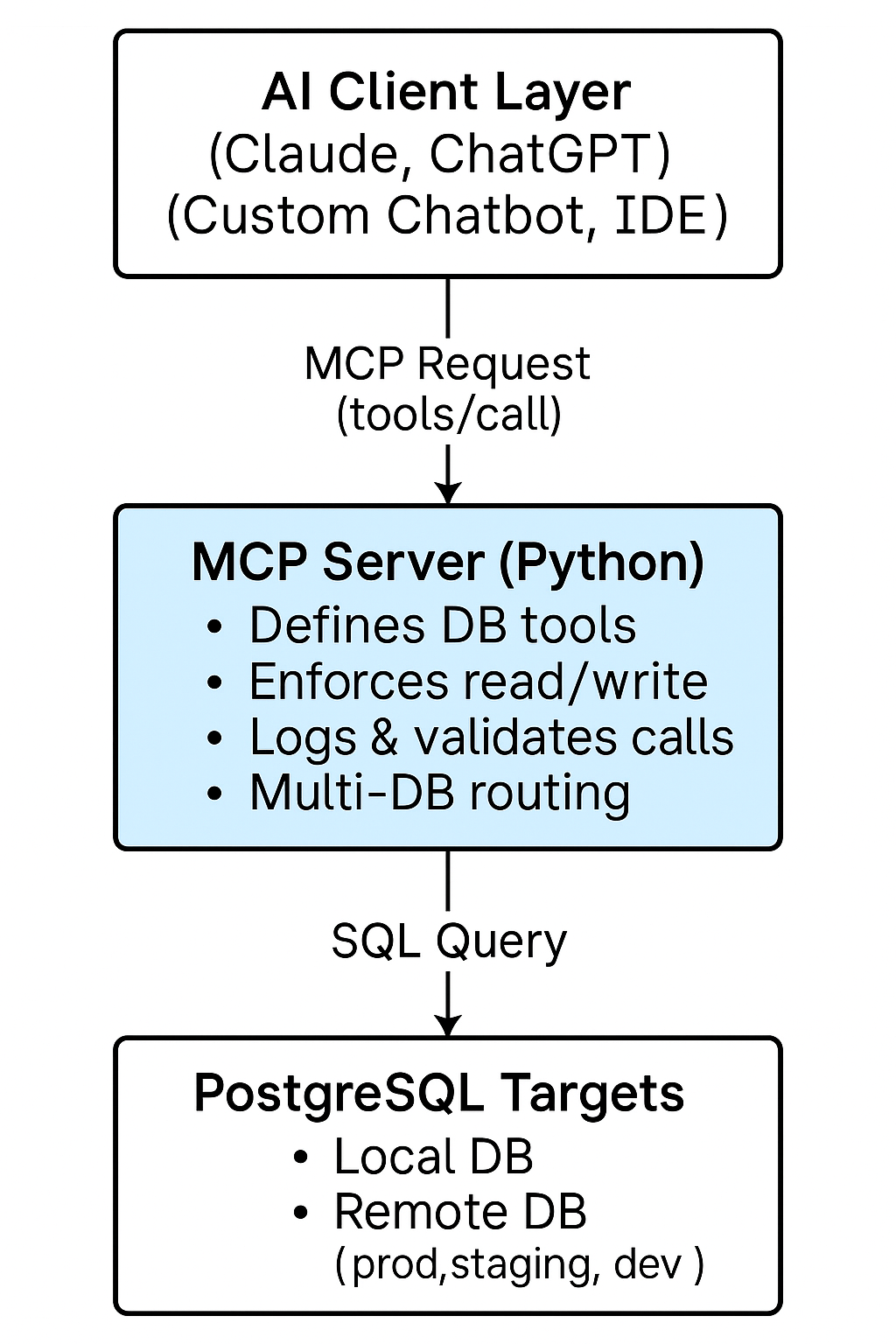
The architecture is designed to provide a secure, governed, and efficient bridge between AI systems and PostgreSQL databases. It is composed of three clearly defined layers: the AI client, the MCP server, and one or more PostgreSQL instances. Each layer performs a distinct role to ensure controlled access, operational safety, and a consistent user experience.
At the top of the stack, the AI client whether Claude, ChatGPT, or a custom enterprise assistant serves as the conversational interface. The client does not access the database directly. Instead, it communicates exclusively through standardized MCP tool calls, ensuring that all interactions remain predictable, auditable, and constrained by the server’s configuration.
The MCP server functions as the central control layer. It interprets incoming tool requests, enforces security policies, and executes approved operations against the database. All SQL execution, schema discovery, and health checks occur within this controlled environment. The server can route requests to multiple back-end databases, such as local development environments or remote production systems, without exposing credentials or network access to the AI layer. By centralizing logic and enforcing access rules such as read-only modes or filtered SQL the server ensures compliance and minimizes operational risk.
At the foundation of the architecture are the PostgreSQL databases themselves. They are protected behind network security groups, firewalls, and PostgreSQL’s own authentication rules. The databases only accept connections from the MCP server, never from AI clients or external sources. This separation ensures that sensitive data remains within the organization’s security perimeter while still enabling powerful, natural-language interaction through the AI layer.
Together, these components form a secure, scalable architecture that allows enterprises to leverage AI for data exploration and analysis without compromising governance or database integrity. The model promotes strong isolation of responsibilities, measurable accountability, and centralized control key requirements in enterprise data environments.
These are the capabilities I added to my PostgreSQL MCP server:
By default, my server blocks:
INSERT, UPDATE, DELETE, DROP, ALTER, TRUNCATE.This makes the MCP server suitable even for production analytics.
By setting:
ALLOW_ARBITRARY_SQL=trueI can temporarily enable full SQL for internal use.
Claude now understands my database structure, so I can ask:
“List tables”,

“Describe the orders table”,

“What columns contain dates?”
I added tools for:
EXPLAIN plans

Slow queries from pg_stat_statements

Table size breakdowns
This turned Claude into a mini-DBA assistant.
In my .env, I maintain:
LOCAL_DATABASE_URL=...

REMOTE_DATABASE_URL=...

DEFAULT_DB=local
One MCP server, multiple PostgreSQL targets extremely convenient.
Instead of writing queries manually, I now ask:

“Why is query X slow?”

“Show me table statistics for customers.”
Claude fetches the stats, plans, or runtime information through MCP.
Non-technical teammates can ask questions like:
“Give me yesterday’s revenue grouped by region.”

“How many new signups this week?”
The SQL stays on the server; users see only the results.
I can switch from local DB → staging → remote EC2 DB simply by changing .env or the Claude MCP config.
Claude often suggests SQL, and instead of executing it blindly, the MCP server validates and runs it safely.
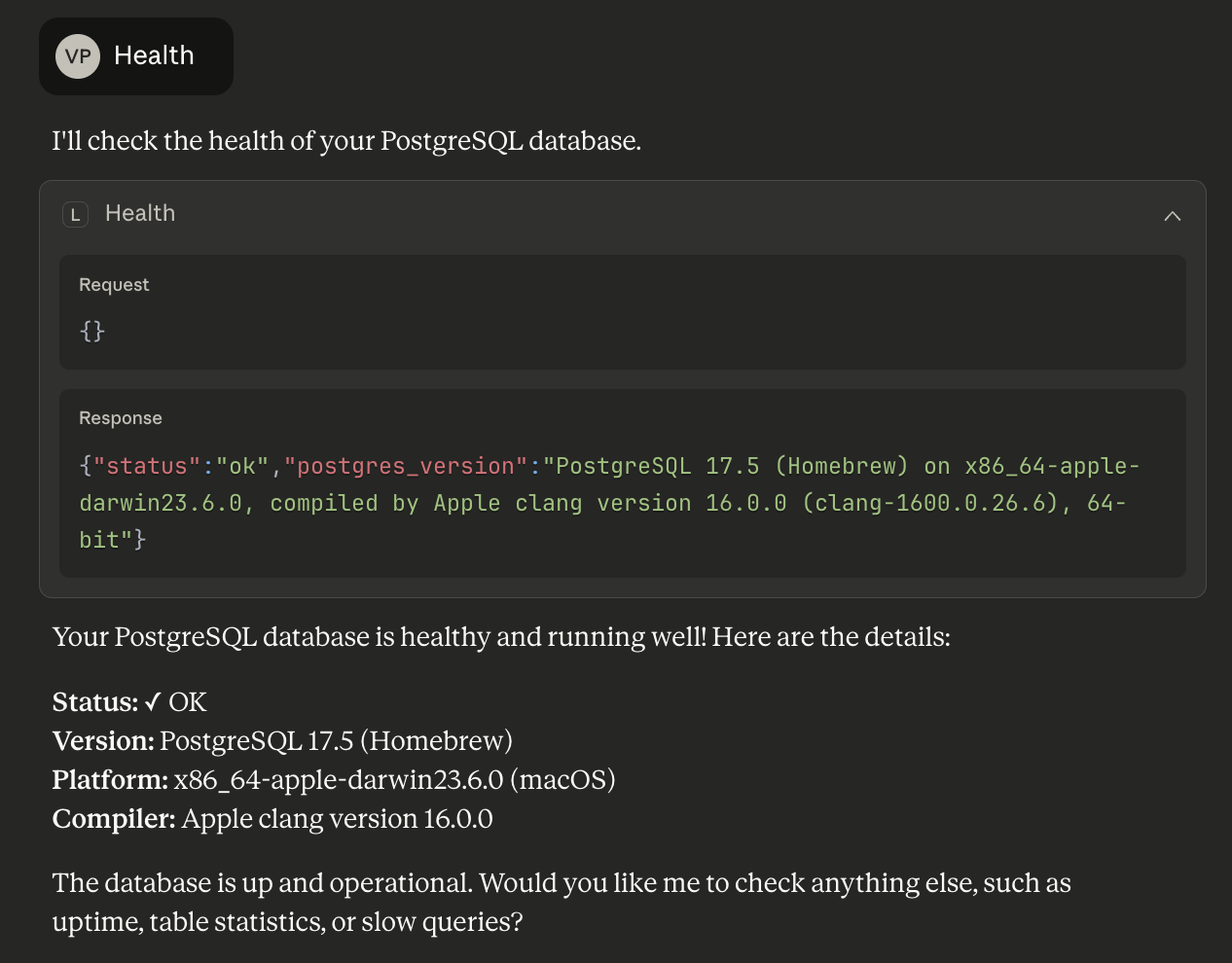
When the MCP handshake succeeded and I typed:
mcp> healthAnd Claude returned:
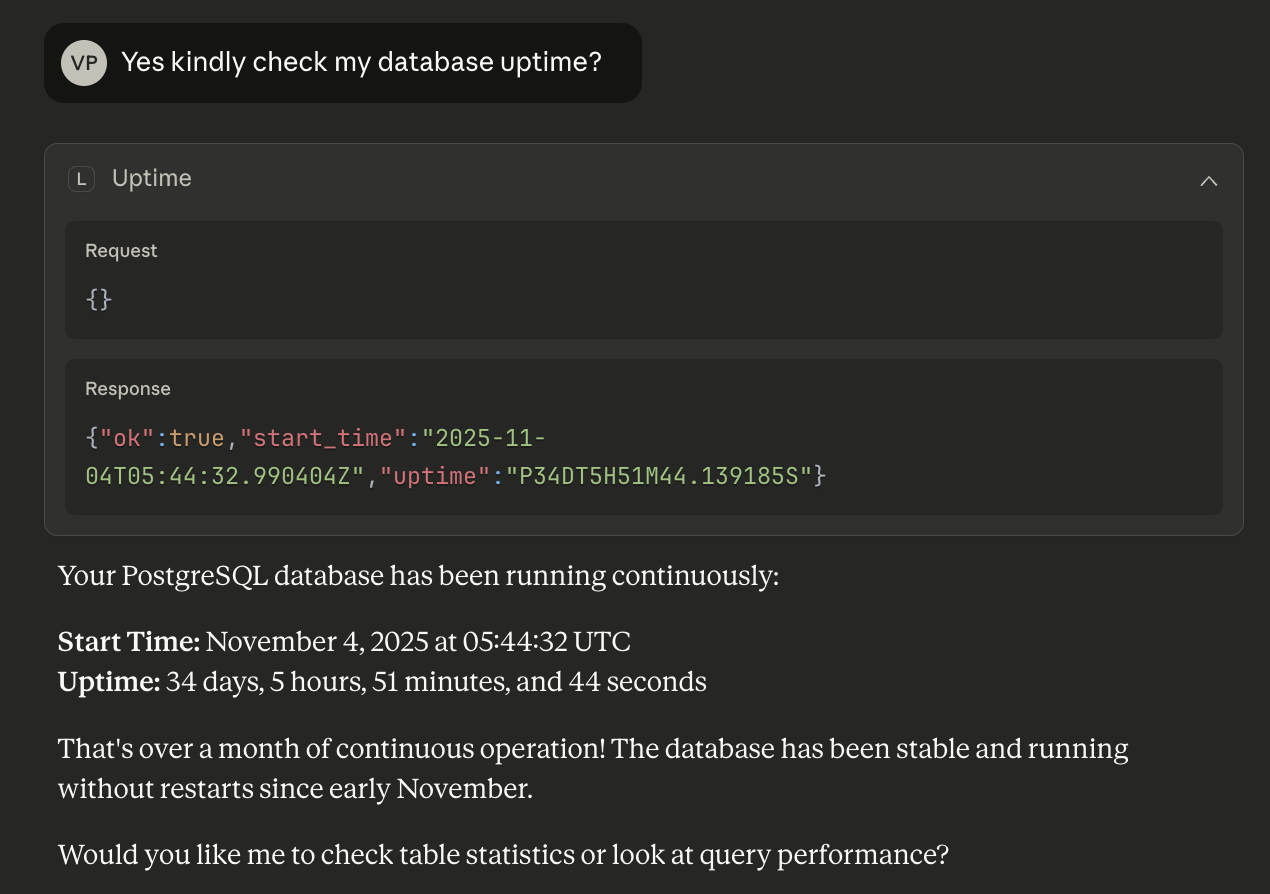
Building this PostgreSQL MCP setup showed me how quickly database workflows can evolve when AI is given secure, structured access instead of guessing through prompts. Claude wasn’t hallucinating or improvising, it was responding with real, live data under strict guardrails I controlled. And that’s the real future here: AI agents that collaborate responsibly with our systems, helping us query, debug, and understand data with the speed of natural language but the safety of well-designed protocols. This integration feels less like a convenience feature and more like the starting point of a new era in how humans, AI, and databases work together.